Distributor Mode
Products in the ZaveIT Platform support two different operational modes that define important behavioral and structural changes. Distributor Mode enables a specialized configuration for products, fundamentally altering how pricing and inventory management work.
When Distributor Mode is enabled, the product structure changes as follows:
- Volume Prices are replaced with Distributor Prices
- Quantity limits are moved from volume pricing configuration to the general product settings
- Distributor and Distributor SKU fields become part of the Distributor Prices section
- Price rules can exclude specific distributors when the product is in distributor mode
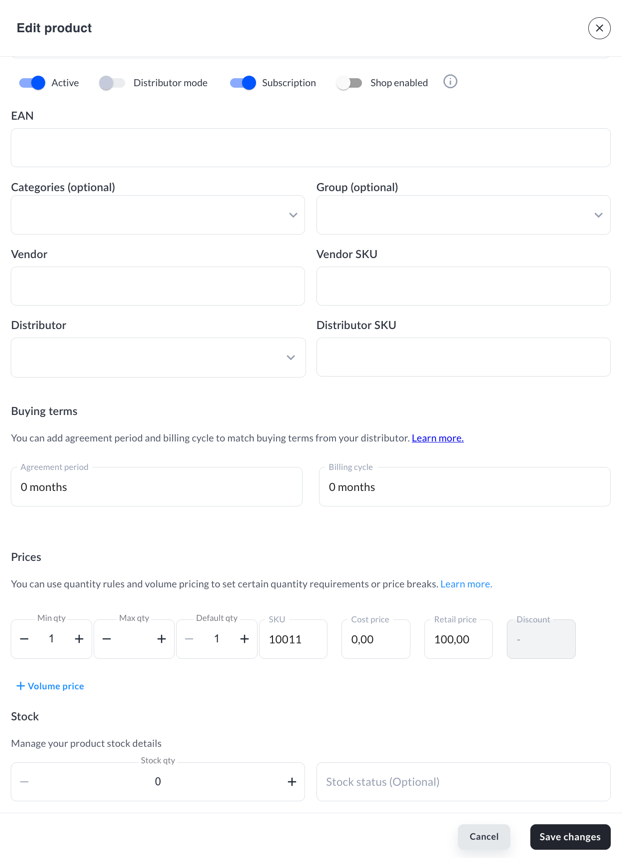
Standard Mode vs. Distributor Mode
Standard Mode
In standard mode, products use Volume Prices to define pricing tiers based on quantity thresholds. The volume pricing configuration includes:
- Min qty and Max qty (quantity range for each price tier)
- Default qty
- SKU
- Cost price
- Retail price
- Discount
Distributor and Distributor SKU fields appear in the main product configuration section, separate from the pricing structure.
Distributor Mode
When Distributor Mode is enabled via the toggle switch at the top of the product edit screen, the pricing structure transforms to accommodate multiple distributors.
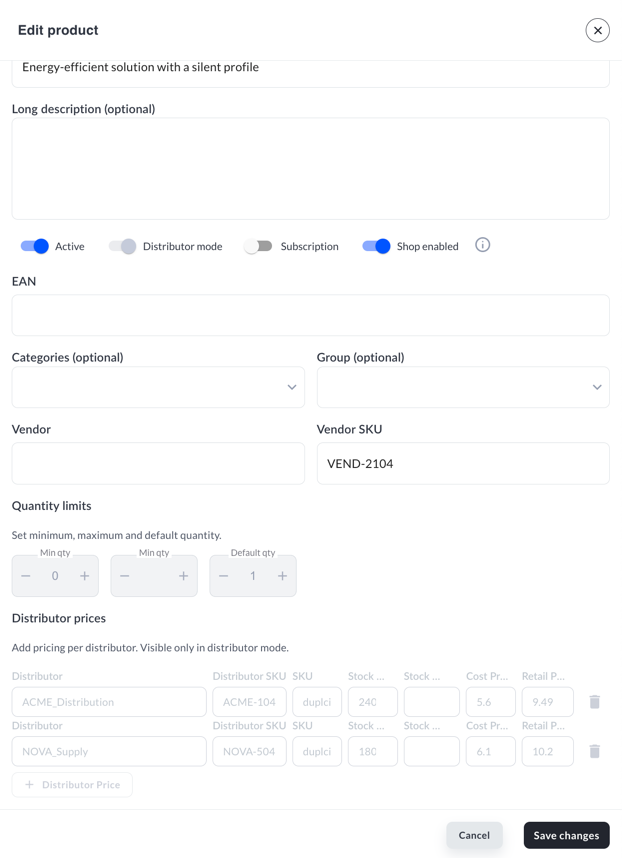
In distributor mode:
- The Volume price section is replaced by Distributor prices
- Quantity limits (Min qty, Max qty, Default qty) move to a dedicated Quantity limits section in the general product configuration
- Each distributor entry contains:
- Distributor (dropdown selection)
- Distributor SKU (the product identifier used by that distributor)
- SKU (internal SKU reference)
- Stock qty (available quantity from this distributor)
- Stock status (optional status indicator)
- Cost Price (purchase price from distributor)
- Retail Price (selling price to customers)
Enabling Distributor Mode
Currently, it's allowed to enable Distributor Mode only during CSV Product Import
Price Rules and Distributor Exclusion
When a product is in Distributor Mode, Price rules can be configured to exclude specific distributors from certain pricing conditions. This allows you to:
- Apply different pricing strategies per distributor
- Exclude distributors from promotional pricing
- Control which distributors are available for specific customer groups or product categories
Refer to the Price Rules documentation for detailed instructions on configuring distributor exclusions.
Switching between Standard Mode and Distributor Mode will restructure the product configuration. Ensure you review all pricing and quantity settings after changing modes to avoid unintended configuration changes.