Product Specifications through 1WorldSync
Product Specifications is a ZaveIT feature that automatically enriches the products in your catalog with manufacturer images and detailed specifications - so your team does not have to source, upload, or maintain that content yourself. ZaveIT handles the lookup, caching, and display across the WebShop and Custom Pages. The only requirement on the catalog side is that each product carries the manufacturer name (Vendor) and the manufacturer SKU (Vendor SKU).
Behind the scenes, ZaveIT looks up matching content in the 1WorldSync global content network, which aggregates manufacturer-supplied product data from a large number of brands. Whenever a Vendor and Vendor SKU on one of your products points to a record in that network, the matching image and specifications are pulled into ZaveIT automatically.
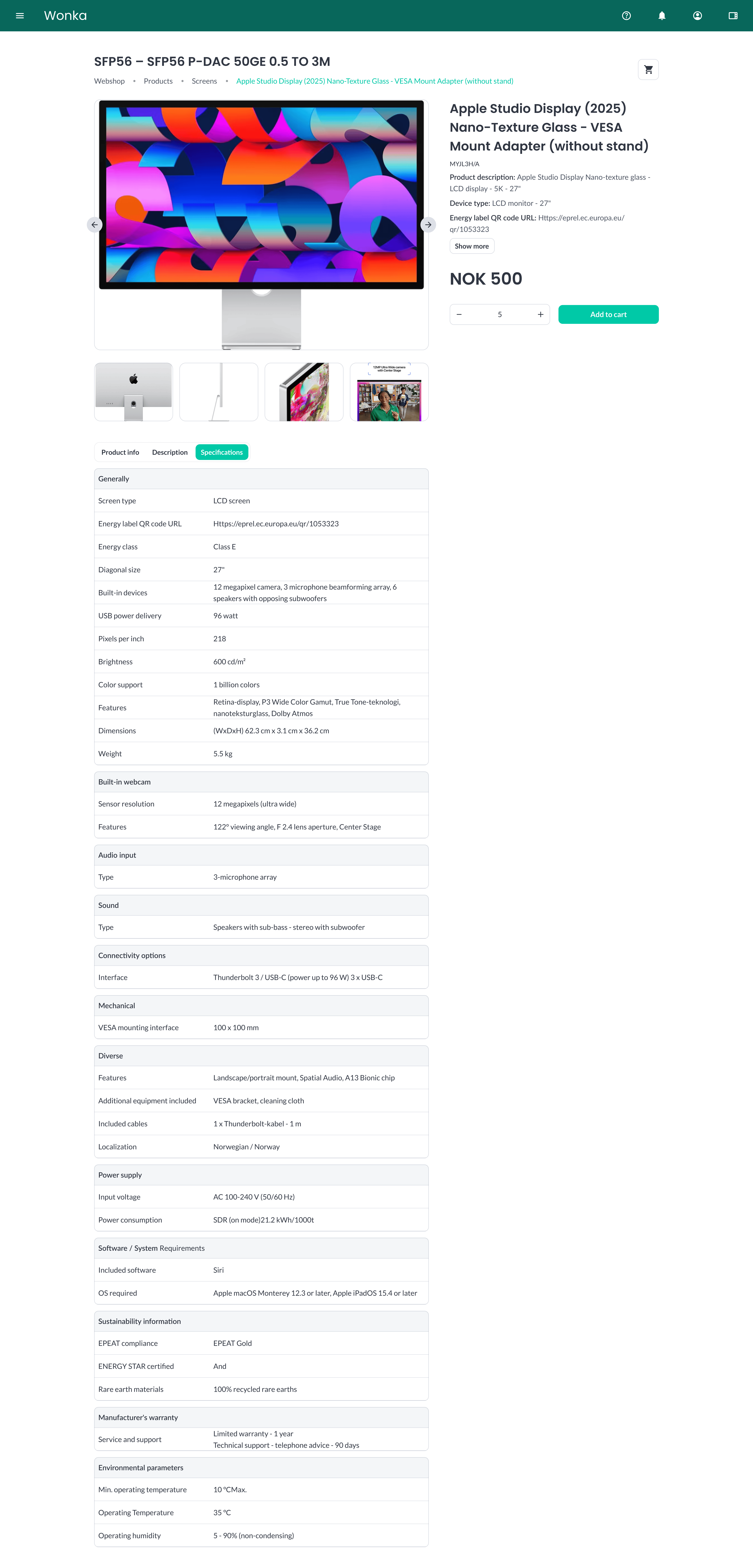
A product detail page enriched with a manufacturer image, image gallery, and full specification table.
The 1WorldSync catalog is large and covers a wide range of brands and product categories, but coverage is not universal. You may run into products where:
- The Vendor and Vendor SKU combination is not in the catalog at all.
- A record exists, but only some content is published - for example, an image with no extended specifications, or specifications without an image.
- The published image quality or attribute set is lighter than expected for a given product category.
In those cases the product simply falls back to the content you have entered in ZaveIT yourself. You can always supplement with manually uploaded Product Images to fill any gaps.
Product Specifications through 1WorldSync is offered as a paid add-on. While the billing flow for the add-on is being finalized, the feature is available to all platforms by default - for the time being.
Why use it
Product catalogs imported from distributors often arrive without product images, and the descriptions are usually short and inconsistent. Customers shopping in your WebShop expect to see clear pictures and detailed specifications before they decide to buy.
Product Specifications closes that gap without adding manual work:
- Manufacturer images are shown automatically on WebShop product cards, the WebShop product detail page, and Custom Pages.
- Detailed specifications (dimensions, supported standards, warranty, energy class, and other manufacturer-supplied attributes) appear on the product detail page in the WebShop.
- No upload work for your team - as long as the Vendor and Vendor SKU are set on the product, the content is pulled in and kept up to date for you.
Many distributors distribute their catalogs as CSV files that include SKUs, prices, and stock - but no hosted product images. Product Specifications fills that gap by sourcing images and attributes directly from the manufacturers.
How it works
- Set the Vendor and Vendor SKU on each product. You can do this in bulk during product import or manually on individual products. See Set up Vendor and Vendor SKU.
- Open your WebShop. Products with a matching record now load with the manufacturer image on the product list and the full specification table on the product detail page.
- Any product highlighted on a Custom Page will also have its image fetched automatically. See Where the enriched content appears.
In this section
- Set up Vendor and Vendor SKU - Map the manufacturer fields during import or on individual products.
- Where the enriched content appears - See where Product Specifications shows up across the platform.